

Filing your Colorado state income tax return can be a relief—but it’s only the first step. After you submit, you’ll want to confirm that the Colorado Department of Revenue (CDOR) has received it, is processing it, or has issued your refund. This article walks you through all the reliable methods to check your return’s status and what to do if you don’t see expected updates.
1. Why It Matters to Confirm Receipt
Knowing whether Colorado received your return helps you:
- Ensure your refund or credit won’t be delayed.
- Catch errors early (e.g. wrong Social Security number, missing schedules).
- Understand when to follow up or escalate.
Because state systems can lag (especially during tax season), keeping track prevents surprises.
2. Methods to Check Your Colorado Tax Return Status
2.1. Online via Colorado Revenue Online
This is the quickest and most direct method. The CDOR uses the same “Where’s My Refund?” view that their staff sees. :[oaicite:0]{index=0}
Steps:
- Go to Colorado Revenue Online.
- Log in (or create an account) if required.
- Select “Where’s My Refund?” / “Check Refund Status.”
- Enter your Social Security number (or ITIN) and the refund amount (sometimes a “Letter ID” is used instead).
- Submit and review the status (e.g. “Received,” “Processing,” “Approved/Issued”).
Note: Because of system delays, it may take a few days for your return to show up.
2.2. By Phone
If you prefer human interaction, you can call CDOR. The main tax helpline is 303-238-7378. Before calling, have this information ready:
- Your SSN or ITIN
- The tax year in question
- Your expected refund amount (as filed)
- A copy of the return (if needed for reference)
Be aware: during the peak season, waits may be long.
2.3. Mail / Paper Return Tracking
If you filed a paper return, it can take longer for CDOR’s systems to register it. Colorado notes that paper filings may take up to 3 months to process.
If your return is more than 8–12 weeks old and you haven’t seen any status change online or by phone, consider following up with CDOR directly or verifying with your mail carrier whether the form was delivered.
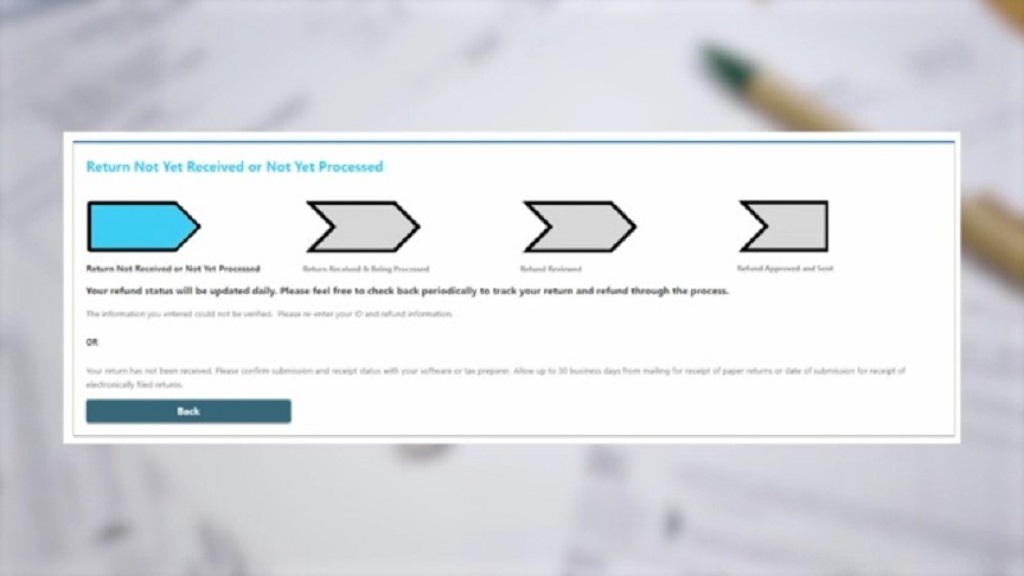
3. Interpreting Refund Status Messages
Here are common statuses and what they mean:
| Status Message | What It Means |
|————————————–|——————————————————|
| **Received / Return Received** | The department has your filing on record. |
| **Processing / Under Review** | CDOR is validating data, checking documents. |
| **Approved / Refund Issued** | Your refund has been authorized, possibly being paid. |
| **Adjustment / Issue Detected** | CDOR may require additional info or there’s an error. |
| **Not Found / Return Not Yet Posted**| Either not yet entered or input error made. |
If you see “Adjustment / Issue Detected,” check your mail for notices from CDOR asking for more information.
Also note: Even if direct deposit was requested, some refunds are converted to paper checks as a fraud-prevention measure.
4. Common Reasons for Delays or Missing Refunds
Your refund might be delayed or missing due to:
- Errors in your return (typos, missing forms).
- Identity verification requests (Colorado uses safeguards to prevent fraud).
- Bank or routing number mistakes (for direct deposit).
- Return flagged for additional review (complex returns, credits claimed).
- Postal delays (for paper returns or checks).
- Refunds intercepted (for unpaid debts, child support, etc.).
5. What You Should Do If You Don’t See Your Return
If your return doesn’t appear in the system or there’s no status change:
- Double-check your submission: confirm your e-file software shows it was accepted.
- Verify you entered correct data (SSN, name spelling, bank account).
- Give it extra time — sometimes the system is delayed during busy periods.
- Call CDOR (303-238-7378) with your reference and information.
- If needed, file a “missing refund inquiry” or ask for a reissue of your refund check.
6. Tips to Avoid Delays in Future Filings
- File electronically with direct deposit whenever possible.
- Use reliable tax software or a qualified preparer to minimize mistakes.
- Double-check all personal data, including SSN/ITIN and banking info.
- Watch for notices from the department — respond promptly if asked for info.
- Save confirmation numbers or screenshots when the return is accepted.
Related Topic: People Have Moved to Colorado in the Last 10 Years
7. Conclusion
Confirming that Colorado received your tax return isn’t just about peace of mind — it ensures your refund or credit gets processed without unnecessary delay. The best path is using the Revenue Online portal, which mirrors the department’s internal view. If that’s not enough, calling the tax helpline or checking the mail for notices helps you stay in control.
Next time, file electronically, enter data carefully, and keep your confirmation records close. That often makes the difference between a smooth refund experience and weeks of uncertainty.